2016年5月24日星期二

Windows 10 Pro/Home activation error Code:0xc004f014


this error is usually caused by

1) use a pro key to activate home edition, or a home key to activate pro edition;
2) use a activate pro key to upgrade Windows 10 home to 10 Pro.

first check your system information, choose the matched key to activate or upgrade.


Office 2016 vs. 2013: What’s new and improved?

If you’ve been an Office user for a long time, you’ve certainly noticed the tremendous changes that Microsoft has made over the years. Since the year 2000, you’ve worked with Office 2000, XP, 2003, 2007, 2010 and 2013. Each of these versions introduced new improvements to your work day.
The Office suite is now more than just a set of tools for word processing, spreadsheets, presentations, publishing, and email messaging. Productivity has been brought to a higher level with sharing, co-authoring, mobility and more. Our previous blog focused on new cool features of Office 2016 and today I’d like to compare Office 2016 vs. 2013 and 2010 versions.
If you’ve been stuck with an earlier version of Office, you probably have a good reason. You may have third-party tools integrated with the software, or other business constraints that don’t allow you to upgrade. Or, you simply haven’t found the time to think about it. If you’ve had compatibility issues, you’ve probably installed free Office Viewers and you think it does the trick.
You may have valid reasons for sticking with an older version of the Office Suite. But keep this in mind: your business data are a financial asset that has to be protected. Will Office 2016 help you do this? Yes, and a lot more.
We’ve compared two previous versions of the Office suite with Office 2016 on the following elements:
And the best way to find out if the new version is worth the upgrade is to try Office 2016 by yourself.


2016年5月22日星期日

How to Upgrade From Windows 10 Home to Windows 10 Professional

You’ll need to start the upgrade from the Settings app. To open it, open the Start menu or Start screen and select “Settings”.


Select “Update & security”, and then select “Activation”. You’ll see the edition of Windows 10 you have displayed here.
To upgrade from Windows 10 Home to Windows 10 Professional, click or tap the “Go to Store” button in the Activation pane.
The Windows Store app will open to a special “Upgrade to Windows 10 Pro” screen. From here, you can click or tap the “$99.99” button to purchase the Windows 10 Professional upgrade form the Store like you’d purchase anything else from the Store. You’ll have to provide your Microsoft account information and payment details.
If you have a Windows 10 Pro product key, you can select the “I have a Windows 10 Pro product key” and enter the product key to upgrade.

Note that you can’t upgrade Windows 10 Home to Windows 10 Enterprise — that will require a complete reinstallation with an Enterprise product key. There’s also no Ultimate edition of Windows 10 with the Enterprise features available for Home users as there was with Windows 7 and Vista.


2016年5月12日星期四

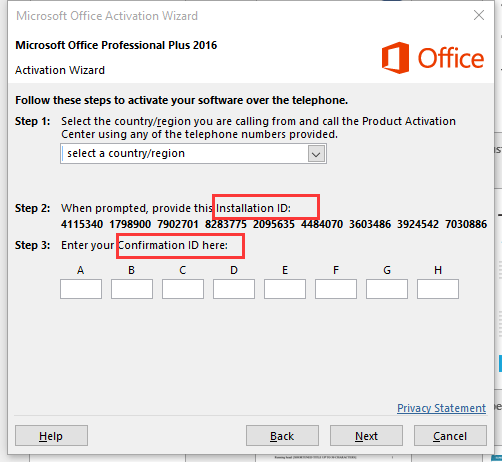
Office Pro Plus 2016 installation&phone activation

after download the ISO file, extract to a folder. and click"setup.exe" to start installation.(for 64bit system, use the setup64.exe in folder "office")


choose "Enter a product key instead"


2016年5月11日星期三

[Free download] Office Products Uninstall Tools

sometimes, uninstall from Control panel fails, and you can not reinstall the software, try this tool to do a clean uninstall.

here is the download link
https://www.dropbox.com/s/1zv2lnymzi23zcl/Office%20uninstall.rar?dl=0

there are 4 files, for Office 2003 2007, 2010, 2013&365 uninstall.


how to install Office 2016 from ISO file

if you've already downloaded the ISO file, there are 2 ways to start install

1. use a virtual drive. when you open the ISO, it looks like this

2. extract the file to a folder, use some softwares, like WinRar.

then you can click Setup.exe to start installation.

Important:

some times, after installation, you can not use the key to activate correctly. that maybe because the wrong edition.

there are 2 install files in the pack, one for 32bit system, and one for 64bit system.

open the file, you will see Setup.exe, usually this one is for 32bit. if your system is 64bit, open folder"Office",

and choose setup64.exe.


2016年5月5日星期四

Acrobat XI offline activation

here is the download link for latest version

https://helpx.adobe.com/acrobat/kb/acrobat-downloads.html

extract the install pack, click "set-up.exe"